
How To Use The Collage Feature On Instagram

Brands, business owners, and content creators! Looking for a quick way to create engaging Instagram stories without spending hours designing content from scratch? Instagram’s Collage feature is exactly what you need!
From aesthetic photo dumps to behind-the-scenes moments, this feature makes it simple to turn everyday photos into eye-catching story content directly within the app. We’re breaking down exactly why this feature is so useful, especially for small business owners, how the feature works, and how to use it creatively.
If you’re always trying to keep up with social media trends, this feature is perfect for you! Read on –
Why This Feature Is So Useful For Creators And Brands
The collage feature supports up to 20 images in one story. For brands, versatility is everything - with one story, you can show so much!
Instagram automatically generates layouts, saving time and effort on editing, which is always a plus.
Additional features like stickers and music can also be incorporated into this feature.
Keep reading to follow the step-by-step guide on how to use this feature effectively!
Here’s All The Steps To Try This Collage Feature
Step 1: Accessing The Collage Feature
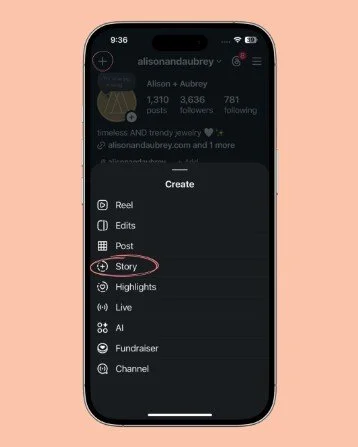
For starters, open the Instagram app. Tap the “+” create icon on the top left and tap “story”.
This will open up your camera roll and give you a few options for the type of story you want to create. From here, you can select “Collage” at the top.
Step 2: Creating The Collage
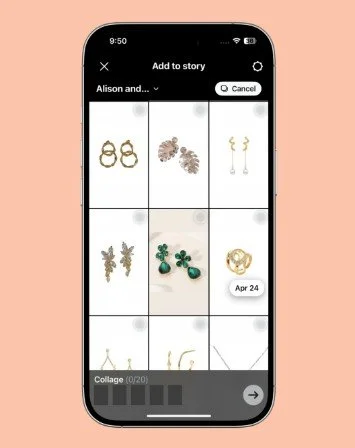
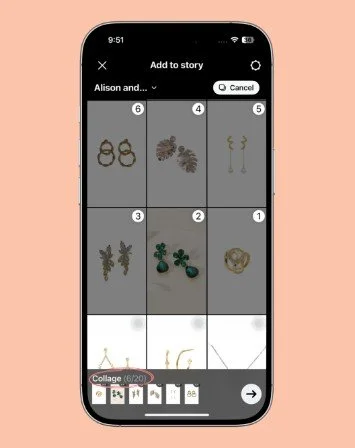
Instagram allows you to select up to 20 images to add to the collage. For this feature to work, you must select a minimum of 5 photos. Simply scroll through your camera roll and pick the photos you wish to feature in your collage. Once you’ve selected the photos, tap on the “→” arrow at the bottom right of the screen. This will take you straight to the automatically generated collage! Pretty cool, right?
Step 3: Rearranging And Editing Your Collage
One of the best parts of this feature is how easy it is to experiment with layouts. Instagram offers you two layout options, “Sequential” and “Cutouts.” With the sequential option, your photos will appear one after the other based on the sequence you choose. Alternatively, the cutouts option creates cutouts of the main subjects in your photos and displays them before merging them back into their original background one after the other.
If you don’t like the arrangement of your photos, you can simply tap “X” on the top left of the screen. Select the “discard” option, and now you can rearrange the photos in your collage or add new photos and discard the old ones. Don’t worry, even after selecting discard, all your progress is still there. Instagram temporarily saves your collage setup so you can pick up right where you left off!
This flexibility is what makes this feature more creative and less restrictive than standard story layouts.
Step 4: Saving Your Collage Before Posting
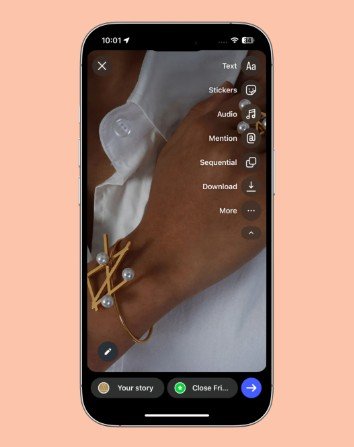
As a content creator or a business owner, you must consider the whole picture. It is essential to repurpose your content and share it across various social media accounts for visibility and engagement. Before you hit publish on the new story you created within minutes, it’s a good idea to save the collage to your phone. Hit the “download” button from the menu options on the right.
This content can be easily repurposed for:
TikTok Stories
Facebook Stories
YouTube Shorts
Pinterest Pins
Step 5: Adding Final Touches For The Perfect Story
Once your collage is complete, you can customize it using Instagram’s regular story tools. Adding text, stickers, GIFs, links, and music are all various options you can experiment with to further elevate your collage. This helps turn the simple collage into fully-branded and cohesive content to share with your audiences.
Ideas For How You Can Create Content Using This Feature
Let’s say you have a podcast. This feature works well for promoting a new episode. You can create a collage using guest photos, cover art, quote graphics, and screenshots from the recording session, and combine it all into one story. For podcast marketing, the new dynamic promotional content does all the work without relying on any advanced design software.
Similarly, this feature can be used for:
Outfit previews
Event highlights
Behind-the-scenes shots
Photo dumps
Final Thoughts
Instagram’s new Collage feature is quick, fun, and versatile! It allows users a built-in way to create layered visual content without relying on third-party editing tools.
At the end of the day, it’s about being consistent with your social media strategy and connecting with your community. This is another fun way to do that and showcase some personality in your brand.
If you already regularly create content for social media, try out this feature! It is just a few taps away!
Need extra help with your business’ content creation? The Social Snippet team is always here to help! Get in touch with us via our website or socials for your social media management needs!